I'm teaching two totally online classes for the first time this summer, and while the majority of the course is pre-packaged and ready to go, I wanted to make a few customizations to make the course easier for students to navigate, and to make it a little more personable. So I created a video introducing myself (and providing a little bit of cultural information about how not to address teachers in Spanish) and a screencast walking through where everything is located in Blackboard and MySpanishLab.
The syllabus is given to me by the course coordinator, so all I really need to do is fill in my contact information and post it to Blackboard. But I went to a faculty development workshop a few weeks ago on creating a good syllabus, and learned that there is a syllabus website at the school where I'm adjuncting that generates a web-based syllabus. The information in the syllabus is the same one way or the other, but in a 10-page document, it's nice to have tabs that you can click that will direct you to the section you're interested in, rather than scrolling through a pdf for days. So I went in to the site and used it to create my syllabi, and then posted the links in Blackboard, and thought I was all set. But my courses started today, and several students emailed to tell me that the site would not let them in to see the syllabus (it requires a login). I checked with tech support, and my students are apparently using the appropriate login credentials, but still can't get in.
I would prefer to have my syllabus in a place that doesn't require a login, and obviously I have a little experience setting up websites, but I wasn't sure I had quite enough know-how to create the syllabus site I wanted to make. In particular, I didn't know how to link navigation tabs to different spots on the site. It turns out that it's pretty easy...you just have to do a little basic HTML editing. I had no idea what the feature was, but I now know that it's called an anchor tag, and if you google it, you can find the code and modify it, which is how I customize all of my sites. So armed with this new bit of code, I created a new website for my syllabi this summer:
http://syllabus.anitasaalfeld.com
(I also created a copy of the site and made it a template, available here:
https://sites.google.com/a/anitasaalfeld.com/metrosyllabustemplate/ )
Tuesday, June 6, 2017

Sunday, May 21, 2017
Kahoot!
I realize that almost everyone has heard of Kahoot by now, but I just realized that I never did a blog post on one of my new favorite technologies. A few years ago I posted about Poll Everywhere, a polling site that lets you create polls for students to answer. Kahoot is similar, but in a more game-like format (it includes game show-type music and keeps score).
It's a great tool to do comprehension checks, especially for more complicated topics. I created a Kahoot for preterit and imperfect in Spanish, focusing on interpreting whether an action had been completed or not (based on a grammaticality judgment task I took as a grad student way back in the day). For example:
Anoche leía una novela.
Then students decide:
A. I finished the novel.
B. We don't know if I finished the novel or not.
(You could also add "C. I didn't finish the novel." to make it more interesting. For the curious, the answer is B; the use of the imperfect indicates that the action was in the past, but leaves the finality open-ended. In other words, when the imperfect is used, we don't know if the action/event was completed or not.)
Kahoots also are great for doing exam reviews, but I wanted my students to be able to use them on their own if they wanted, and not just during class. It's designed for use in a classroom, with the questions & answers projected on a screen and students responding from their devices, but they can use it individually with a few modifications. They have to create an account in Kahoot, and then they can access your activity in preview mode. One thing to note about preview mode is that it will not show up as an option if your browser window is too small, so if you're looking for it and it's not there, make your browser window bigger. I give students my Kahoot user name so they can look for my materials, and make sure to title them something obvious like "SPAN 1110 Exam 1 review."
In case it's helpful, I made a video for my students showing them how they can use Kahoots in preview mode for individual review.
Friday, May 19, 2017
EdPuzzle: Saludos
I'm teaching 100% online for the first time this summer, so I'm starting to create materials for my courses. I decided I want to do short video lessons, but I also wanted to integrate an interactive element since just watching/listening to a video isn't very engaging and won't help learners process the language.
After a little looking around, I decided to use EdPuzzle, which allows me to take existing videos from a number of sources and add my own interactive components. Students can sign up for an EdPuzzle account, or you can choose to make it available to anyone with the link. EdPuzzle provides an embed code so that you can embed it into a course platform such as Blackboard. If you want to assign the videos as homework, you can create a class and require students to enroll, and the best part is that it's free for you and your students.
I'll be posting all of my materials in Blackboard for my courses, but I'll also post them here for more general accessibility.
Saludos
After a little looking around, I decided to use EdPuzzle, which allows me to take existing videos from a number of sources and add my own interactive components. Students can sign up for an EdPuzzle account, or you can choose to make it available to anyone with the link. EdPuzzle provides an embed code so that you can embed it into a course platform such as Blackboard. If you want to assign the videos as homework, you can create a class and require students to enroll, and the best part is that it's free for you and your students.
I'll be posting all of my materials in Blackboard for my courses, but I'll also post them here for more general accessibility.
Saludos
Sunday, January 29, 2017
More marketing garbage: Scholarship scams and paper mills
1. Scholarship scams

I received this email last month, and am finally getting around to blogging about it. The email is from Kimberly Grey (kim.grey@student-email.org), and is asking me to post a link to a commercial site on my website because the company is supposedly offering an essay scholarship contest.
If you've read my past blog posts on these types of emails, you'll note a few departures from previous strategies. In the past, the people that contact me posed as well-meaning students or volunteers who are letting me know about a great organization. (They are actually paid marketers, promoting a client's website.) They provide a link to a reputable, established organization, as well as to an unknown one. The unknown one is a site that promotes their client's business. For example, some of these sites claim to be sites devoted to helping people quit harmful substance addictions, but if you click around, you can find links to commercial products such as in-home drug tests, which I assume is the client's product. As I noted in a past blog post, the marketer is posing as a student or volunteer so that you'll be more likely to post the link to your resource page, because they know that if they were to email you and say that they're paid marketers trying to improve their client's SEO ranking, you would tell them to get lost.
...the marketer is posing as a student or volunteer so that you'll be more likely to post the link to your resource page, because they know that if they were to email you and say that they're paid marketers trying to improve their client's SEO ranking, you would tell them to get lost.
This email is more direct; the sender doesn't pretend to be a student or volunteer, and instead clearly states the name of the company (which I've removed to avoid generating traffic for them). Instead, the new approach is apparently to get educators to post links to their client's website by claiming that their client is offering a scholarship. In addition to this site, a couple of sites that I've dealt with in the past now say that they're offering scholarships, and one of them says that they've awarded a few. I thought about trying to verify it, as one of the sites includes the names and academic affiliations of the students, but I'm not sure how I would be able to do that because FERPA would prohibit the schools from telling me if there is a student by that name enrolled there. Isn't that convenient? While I can't prove anything due to the aforementioned FERPA law, I strongly suspect that these scholarships do not exist. Consider:
My organization awards an annual scholarship of $500 to the person who comes up with the best email reply to these obnoxious marketers. The first winner of this scholarship (Spring 2016) is Rebecca Jackson, a student at the University of Nebraska-Lincoln. Interested students should send a 200 word response to essaycontest@profesoraanita.com, and include their name, address, telephone number, email address, and the name of their school.*
It took a few minutes to actually set up the email address, but other than that, it took me about 60 seconds to create that paragraph and make up a fake name for a real school. If I wanted to make it fancier and more convincing, I could create a new website and buy a new domain name for $10-15/year, and create content that would make it look like I am a non-profit organization awarding a scholarship.
Because I believe that these scholarships don't exist, I reported them to my state attorney general and to the FTC, and I strongly encourage other recipients of these messages to do the same. Here's the link to report to the FTC and find your state attorney general:
2. Paper mills

The email from Keira included two apparently legitimate sites for English language resources, and a link to a grammar tutorial on a paper mill site. I've left the link to grammarly, but the other link was for a paid curriculum, and while I believe it's probably fine, I don't want to generate traffic for a paid product site without knowing more about it. I guess I should congratulate Keira on the sheer audacity of asking an educator to post a link to a site whose sole purpose is to help students plagiarize. Again, the purpose of asking people to link to these sites is that the more links these sites have, the higher they'll appear in a search ranking. So if you're an educator that maintains a resource page and you post a link to the paper mill site (even for the grammar tutorial), you're actually helping this site make money by making it easier for students to find it in a Google search.
So if you're an educator that maintains a resource page and you post a link to the paper mill site (even for the grammar tutorial), you're actually helping this site make money by making it easier for students to find it in a Google search.
If you're not familiar with paper mills, most sites will say that students should use the papers they purchase as a resource, and not submit them as their own work, but the purpose of the sites is for students to submit their assignment and have someone else write the assignment for them.
If you're an educator or curator of a resource page, I recommend not accepting link suggestions from unknown sources. Most of them are not good resources in terms of content, and you may end up actually supporting something that undermines what you're doing in the classroom by including these links on your resource page.
*In case it is not immediately obvious, I am not awarding a scholarship; I'm displaying how easy it is to claim on the internet that I am awarding a scholarship.
Previous posts on this topic:
http://www.profesoraanita.com/2015/04/more-marketing-garbage-now-from-tobacco.html
http://www.profesoraanita.com/2014/06/kelly-graves-and-morrow-community-center.html
Update on 3/21/2017: I just received another fake scholarship email, this time from Lindsey Johnson (lindsey.johnson@sc-student.org). If you've also received these emails, could you please leave the sender's name and email address in the comments? It makes it easier for people Googling to see whether this is a real opportunity to find this page.

Update on 5/9/2017: I've received another fake scholarship email, from Jeniffer Lewis (jeniffer.lewis@uriemail.org; though note that in her email she says her name is Jennifer). As always, the link to the site offering the fake scholarship has been removed to avoid generating traffic for it. The domain http://uriemail.org appears to redirect to http://my.uri.edu (University of Rhode Island). I've contacted the email abuse address to let them know that these spammers appear to be trying to misrepresent themselves as part of the University of Rhode Island.
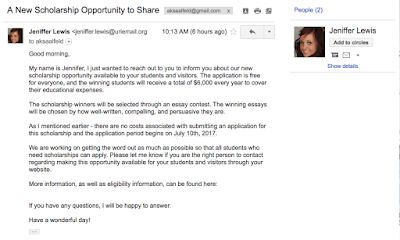
Updated on 6/13/2017: I've received a follow-up email from Lindsey Johnson asking if I'd had a chance to consider her previous email. I forwarded her my two original email messages sharing my (very pointed) thoughts, and then replied with a new email proposing another tag for this post entitled 'Persistent stupidity.' Congratulations on the new tag, Lindsay!
Update on 3/21/2017: I just received another fake scholarship email, this time from Lindsey Johnson (lindsey.johnson@sc-student.org). If you've also received these emails, could you please leave the sender's name and email address in the comments? It makes it easier for people Googling to see whether this is a real opportunity to find this page.

Update on 5/9/2017: I've received another fake scholarship email, from Jeniffer Lewis (jeniffer.lewis@uriemail.org; though note that in her email she says her name is Jennifer). As always, the link to the site offering the fake scholarship has been removed to avoid generating traffic for it. The domain http://uriemail.org appears to redirect to http://my.uri.edu (University of Rhode Island). I've contacted the email abuse address to let them know that these spammers appear to be trying to misrepresent themselves as part of the University of Rhode Island.

Updated on 6/13/2017: I've received a follow-up email from Lindsey Johnson asking if I'd had a chance to consider her previous email. I forwarded her my two original email messages sharing my (very pointed) thoughts, and then replied with a new email proposing another tag for this post entitled 'Persistent stupidity.' Congratulations on the new tag, Lindsay!
Monday, April 25, 2016
Gamification can be low-tech
If you keep up with education news, you might be familiar with the concept of gamification. (If not, basically, it's applying principles of playing a game to something that isn't a game, generally to make it more interesting/fun/enjoyable to the audience.) I've attended some talks on the topic, and have been intrigued by the idea. Of course, as language teachers, we use games regularly to help students review; one of my favorite new tools is kahoot, which turns my reviews into a game, complete with timer and countdown music. (Thanks to my sister, Becca, for telling me about this last semester!)
I've posted my Go Fish games here, along with templates that could be used to create custom Go Fish games.
*However, I also realized that it had somehow never occurred to me to create a bingo game for my phonetics class, so our end-of-semester review of phonemes and allophones is a brand-new phonetics bingo game!
Saturday, February 20, 2016
Making writing assignments more interesting
This one will be short and sweet. I was rethinking my writing assignments this semester, after having students do blogs on Blackboard last semester, which may have been my worst idea ever. (Blogs in Blackboard basically don't look anything like real blogs. They make it impossible to forget that you are only there to grade an assignment, not to enjoy what you're reading.)
So this semester, I switched it up a little. Students can choose their format, and can submit a Word document, a PowerPoint presentation, an Adobe Express page, a video recording, or an audio recording for each homework assignment.
What is Adobe Express? It's basically a page that looks like a blog post, without the hassle of actually running a blog. (It's also very easy to find nice images using their image search tool.) The idea behind allowing a variety of formats is that students can feel free to be creative if they want. And I particularly like the PowerPoint and Adobe Spark options because assignments are visually much more interesting and appealing to me, the reader, when they include images (and when the text is broken up into smaller chunks).
Here are some examples:
Friday, February 12, 2016
Finding images for teaching
In the early days of the internet, before most people were thinking about copyright, if I needed an image for a PowerPoint presentation, I went online and downloaded it or did a screen capture and just used the image without attribution. While that was certainly easy, it was more than a little ironic that I would have failed a student for taking someone's material and submitting it as their own, but didn't provide any attribution for work created by others.
So now I'm using images that are licensed for reuse, usually using a Google images search, because it's easy to specify permissions for image use (I use noncommercial reuse):
There are a number of articles online for how to appropriately cite an image, which are very helpful if you're only using one or two images. But if you're getting a bunch of images to present new vocabulary, properly citing every single one will take you a while (possibly the rest of your life).
That's why I try to use images from Wikimedia Commons (or any Wikipedia page). When you open an image in the media viewer, it will give you the option to download it, and then tell you that you need to include an attribution. But it doesn't stop there; it actually provides the attribution for you, so you can copy and paste it into your presentation.
So, in the spirit of making images accessible and not tedious to use, I offer my latest collection of images that I produced to teach location prepositions, starring Hello Kitty. You are welcome to use/modify these images for any purpose without attribution.
So now I'm using images that are licensed for reuse, usually using a Google images search, because it's easy to specify permissions for image use (I use noncommercial reuse):
 |
| My own image, which you can use for whatever purpose you wish, without attribution. |
That's why I try to use images from Wikimedia Commons (or any Wikipedia page). When you open an image in the media viewer, it will give you the option to download it, and then tell you that you need to include an attribution. But it doesn't stop there; it actually provides the attribution for you, so you can copy and paste it into your presentation.
 |
| By Dwight Burdette - Own work, CC BY 3.0, https://commons.wikimedia.org/w/index.php?curid=14662626 See how easy it is? |
 |
| By Dwight Burdette - Own work, CC BY 3.0, https://commons.wikimedia.org/w/index.php?curid=14662626 You can also change the size of the file you'd like to download. |
 |
| Hello Kitty está a la derecha del reloj. |
Subscribe to:
Posts (Atom)